Docker
Docker
run container
--interactive , -it: connect to container with interact mode
--tty : connect to terminal
--detach : run container in background
--publish 8088:80 : use physical port 8088 for container port 80
check all container information
check container process
check container log
check container detail info
check container resources
execute command in docker container
copy files from host to container
change environment variable
remove container
--force : force to remove even when still running
create a virtual network
delete all container
Build
Docker file
FROM diamol/node

ENV TARGET="blog.sixeyed.com"
ENV METHOD="HEAD"
ENV INTERVAL="3000"

WORKDIR /web-ping
COPY app.js .

EXPOSE 80

CMD ["node", "/web-ping/app.js"]
build docker image base on docker file
--tag: image name.: target directory to build
the build image will locate in cache, use docker image ls to check result
$ docker image ls w*
REPOSITORY   TAG       IMAGE ID       CREATED         SIZE
web-ping     latest    4d95a21e3e1c   2 minutes ago   75.3MB
check metadata of build image
file system
use docker volume to save file change in container file system
create
use in container run: -v
from docker file
notice that
VOLUMEin docker file is different with-vcommand, ifruncommand didn’t specify a volume, it will use the file one, else overwrite it
# app image
FROM diamol/dotnet-aspnet
WORKDIR /app
ENTRYPOINT ["dotnet", "ToDoList.dll"]

# set in the base image - `/data` for Linux, `C:\data` for Windows
VOLUME /data

COPY --from=builder /out/ .
volume can be shared between each container, use --volumes-from
$ docker container run -d --name t3 --volumes-from todol diamol/ch06-todo-list
4a51c9e44995b6876165de59568cc2d4d28af0d569a674759489195bd40019e7
$ docker container exec t3 ls /data/
todo-list.db
container remove will not affect volume.
access host file from container: use bind host
$source="$(pwd)/database" && target='/data'
$mkdir ./database
$docker container run --mount type=bind,source=$source,target=$target -d -p 8012:80 diamol/ch06-todo-list
$curl http://localhost:8012
$ls ./databases
since docker container usually runs with lowest user privilege, if we want to read/write host files, we need to change docker container privilege.
we can set file as read only in host, that way we don’t need change docker image, and achieve changing config…etc
mount will overwrite the container one if same directory
windows cannot mount a file
Docker compose
a tool to manage docker container
example: execute todo-list container using docker compose
version: '3.7'

services:

    todo-web:
        image: diamol/ch06-todo-list
        ports:
            - "8020:80"
        networks:
            - "app-net"

networks:
    app-net:
        external:
            name: nat
- version: docker compose version
- services: element to form a compose, a service might have multiple container
- network: docker virtual network can be join by service
docker-compose command will find a file docker-compose.yml in current working directory
example: multi-container in a composer
version: '3.7'

services:

  accesslog:
    image: diamol/ch04-access-log
    networks:
      - app-net

  iotd:
    image: diamol/ch04-image-of-the-day
    ports:
      - "80"
    networks:
      - app-net

  image-gallery:
    image: diamol/ch04-image-gallery
    ports:
      - "8010:80"
    depends_on:
      - accesslog
      - iotd
    networks:
      - app-net

networks:
  app-net:
    external:
      name: nat
- depends on : service will wail on other until they’re up
- environment: create a environment variable for service
run the docker-compose
--detach: run compose in detach mode
run multiple container in one compose
check compose log
--tail=1: show last log message in eachiotdservice
check process of running service
stop compose
will keep service as last open history
remove compose
will remove service open history
labeling
when trying to launch multiple same compose at same directory, docker compose will not launch duplicate one
we can change compose name to prevent this issue
-p: project name of compose
over-write
when a compose file need to be configured in different use case (such as open multiple same compose with different port), we can use overwrite property to provide different set-up for the same docker-compose file
- original compose file
service:
  todo-web:
      image: diamol/ch06-todo-list
      ports:
          - 80
      environment:
          - Database:Provider=Sqlite
      networks:
          - app-net
- the overwrite one
- execute in terminal
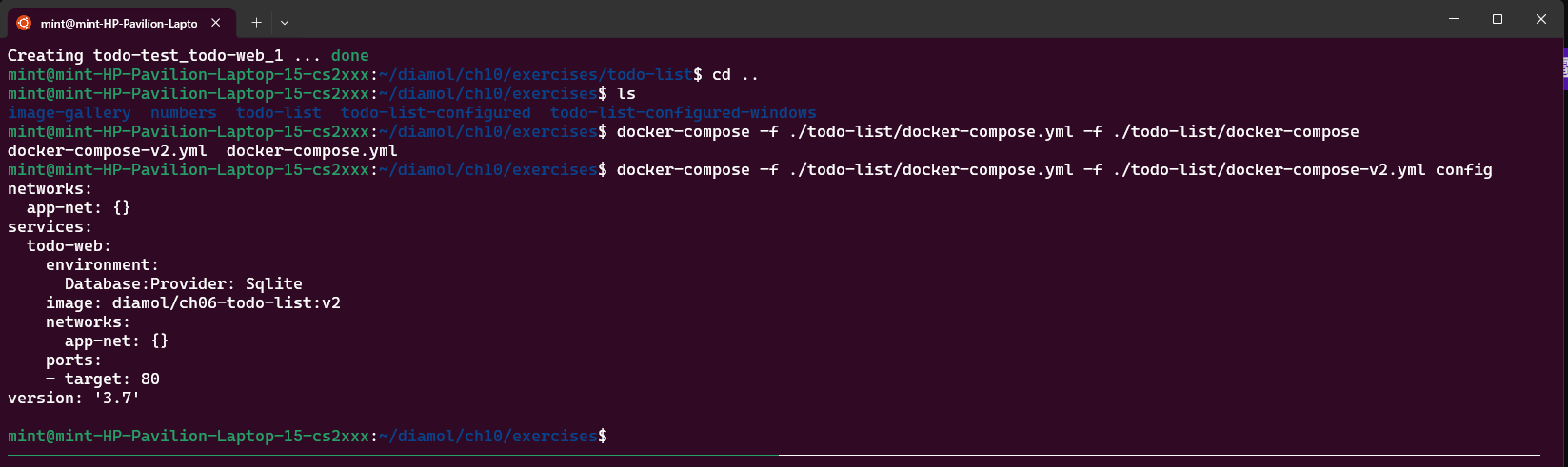
health check
check if process in container exited un-exceptly or not
DOCKERFILE : HEALTHCHECK syntax
FROM diamol/dotnet-aspnet

ENTRYPOINT ["dotnet", "/app/Numbers.Api.dll"]
HEALTHCHECK CMD curl --fail https://localhost/health

WORKDIR /app
COPY --from=builder /out/ .
container will be marked as unhealthy when CMD returns non zero
docker cannot take action about
unhealthycontainer (rm or restart), since it might lost data
dependency check
when launching multiple container, it might not follow the execute order.
dependency check can prevent program runs before any dependency
FROM diamol/dotnet-aspnet
ENV RngApi:Url=http://numbers-api/rng
CMD curl --fail http://numbers-api/rng && dotnet Numbers.Web.dll
WORKDIR /app
COPY --from=builder /out/ .
if curl command success, then open the server, else exit docker container
lastly, write test ourself and intergrade into dockerfile
FROM diamol/dotnet-aspnet

ENTRYPOINT ["dotnet", "Numbers.Api.dll"]
HEALTHCHECK CMD ["dotnet", "Utilities.HttpCheck.dll", "-u", "https://localhost/health"]

WORKDIR /app
COPY --from=http-check-builder /out/ . COPY --from=builder /out/ .
health in docker composer
numbers-api:
    image: diamol/ch08-numbers-api:v3
    ports:
        - "8087:80"
    restart: on-failure
    healthcheck:
        test: ["CMD", "dotnet", "Utilities.HttpCheck.dll", "-t", "150"]
        interval: 5s
        timeout: 1s
        retries: 2
        start_period: 5s
    networks:
        - app-net
monitor
use Prometheus to fetch all data using /metric node from all container
add Prometheus metric into language:
* go: use `gorutine`
* java: memory use in `JVM`
…
Grafana:
a more powerful visualize tool using same protocol as Prometheus
Docker Swarm
connect multiple machine running docker (like a swarm), which will allocate and maintain containers
a computer in a swarm is being called as node
for workers to add into manager, they need tokens to add into it
$ docker swarm init
Swarm initialized: current node (mnp3pr7vpxgn4cwt0ezd0wuw7) is now a manager.

To add a worker to this swarm, run the following command:
doc
    docker swarm join --token SWMTKN-1-586z8vco6elux4gjnvghdp31v9erf8r7bjx5o7mnpapha24m41-2a7dvsccirbpx63d7r6of8jzf 192.168.1.112:2377

$ docker swarm join --token SWMTKN-1-586z8vco6elux4gjnvghdp31v9erf8r7bjx5o7mnpapha24m41-2a7dvsccirbpx63d7r6of8jzf 192.168.1.112:2377

$ docker node ls
ID                            HOSTNAME                            STATUS    AVAILABILITY   MANAGER STATUS   ENGINE VERSION
mnp3pr7vpxgn4cwt0ezd0wuw7 *   mint-HP-Pavilion-Laptop-15-cs2xxx   Ready     Active         Leader           28.0.0
use docker service to manage container under swarm